
Ground News
Snapwise Inc.(dba Ground News)News & Magazines
4.53.45K Reviews
- Version
- 5.1.0
- Installs
- 1.00M
- Age Rating
- Teen
Screenshots
Our Review of Ground News
 Analysis by Appyee
I use a news reader differently when I have five minutes between tasks than when I’m trying to understand a complicated story. Ground News suits the second kind of reading especially well: it puts coverage from different outlets in view so I can compare how a story is being reported instead of stopping at the first headline in my feed. That makes it useful for curious readers, though it is less compelling if all you want is a quick stream of headlines.
It is a free news and magazines app from Snapwise Inc. (dba Ground News), with optional in-app purchases. The current version is 4.25.1, and it runs on Android 6.0 or later. Its 4.7 average comes from around 28,000 ratings, and it has more than a million installs. The Teen age rating is worth keeping in mind if you are choosing a news app for a younger reader; as with any news service, the topics and reporting can be serious.
A useful routine for reading across coverage
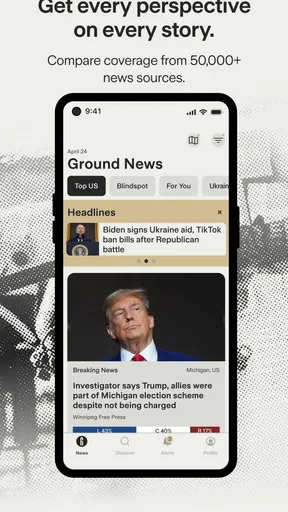
When I first stumbled upon Ground News, I was curious about its promise of unbiased news. The app is designed to offer multiple perspectives on the same story, which is a breath of fresh air in today’s polarized media landscape. The installation was a breeze, and within minutes, I was diving into a world of diverse news coverage.
The interface is sleek and straightforward, which I absolutely love. You’re not bombarded with unnecessary features; it’s just you and the news. The app categorizes stories into local, national, and international segments, making it super easy to navigate. Plus, the dark mode option is a nice touch for those late-night reading sessions.
My practical approach is to start with a subject I already follow, then use the app’s coverage comparisons to find outlets I might not encounter in my usual news routine. I don’t treat a spectrum or a label as a verdict on whether an article is true. Instead, I use it as a prompt to ask what each outlet emphasizes, which details appear across reports, and what deserves a closer read. That small habit keeps the app useful without asking it to do the thinking for me.
Reading the bias indicators with care
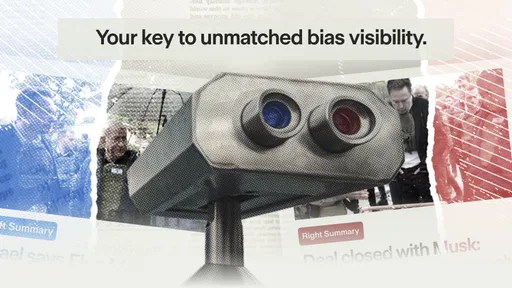
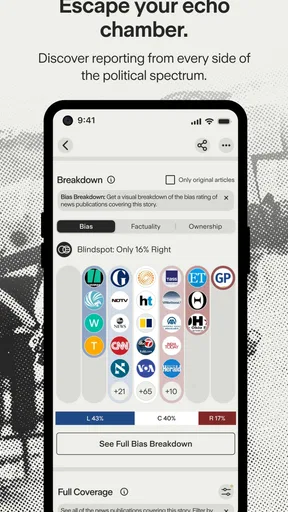
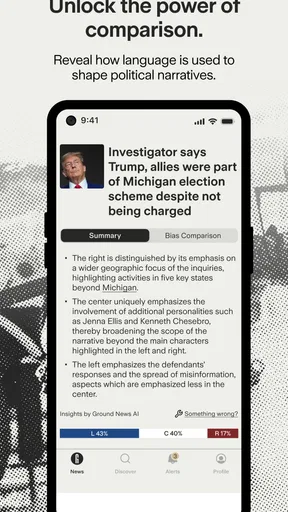
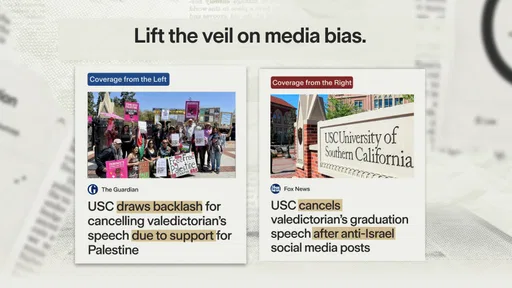
One of the coolest features has to be the bias spectrum. It literally shows you where different publications stand on a particular issue. This way, you can see how the left, right, and center all report on the same story. It’s like having a little media critic in your pocket, helping you cut through the noise and get to the heart of the matter.
I found myself spending more time reading stories from publications I wouldn’t normally consider. The app encourages you to step out of your echo chamber and explore varying viewpoints. This is crucial in understanding the bigger picture and forming a well-rounded opinion.
There is a trade-off here: a source’s position is context, not a shortcut for judging every article it publishes. A story can be carefully reported by an outlet whose general perspective differs from mine, and two articles about the same event may focus on different parts of it. I get the most from the comparison when I open the reporting and look for shared facts, meaningful omissions, and differences in framing rather than choosing a side based on a graphic alone.
Make the feed serve your attention
Customization is key, and Ground News nails it. You can tailor your feed to focus on topics that matter most to you. Whether you’re into politics, technology, or entertainment, the app lets you tweak your preferences. I set mine to get alerts on climate change and tech innovation, and the notifications are timely without being intrusive.
The app also includes a feature called "Blindspot," which highlights news stories that are underreported by either side of the political spectrum. I found this particularly enlightening, as it brought attention to issues that might otherwise go unnoticed.
For a repeatable daily routine, I would keep the topic selection focused enough to make the feed manageable, then check it at a time that already fits my day instead of treating every alert as urgent. A climate story, for example, can be a starting point for comparing coverage rather than a cue to read every article immediately. Blindspot is most useful as a discovery nudge: it can point me toward a subject I might have missed, but I still decide whether it matters to my interests and seek the underlying reporting before drawing conclusions.
What the extra context can—and can’t—tell you
If you geek out over data like I do, you’ll appreciate the analytics section. Ground News provides data on coverage bias, ownership, and even how much coverage a story receives across different outlets. This transparency is rare and incredibly valuable for anyone looking to dig deeper into media dynamics.
I often found myself sharing these insights with friends during debates, armed with facts and figures that added weight to my arguments. It’s like having a secret weapon in discussions about media bias.
I’d use those details to frame better questions, not to settle an argument by themselves. Seeing differences in coverage or ownership can help explain why two reports feel unlike each other, but it does not replace checking the article’s sourcing, evidence, and wording. When I share a story, I’d rather pass along the article and explain what the comparison made me notice than send a chart as if it were the whole case.
When speed matters more than comparison
Reading on Ground News is a joy. Articles load quickly, and the text is clear and easy to read. There’s minimal clutter, allowing you to focus on the content itself. Plus, the app supports offline reading, which is perfect for those subway commutes or when you’re off the grid.
I’ve spent countless hours using the app, and it’s seamlessly integrated into my daily routine. The ability to save articles for later ensures I never miss out on important stories that I might want to revisit.
A realistic use is to scan the day’s headlines over breakfast, save one developing story for a quieter moment, and compare its coverage later rather than trying to finish several reports on a crowded commute. Offline access and saved reading help with that split-session habit. Still, if I only want a fast alert about a local disruption or a short summary of the day, a conventional news app or a publication’s own app may be more direct. Ground News earns its place when I want context, not merely speed.
Where it fits in a news routine
I use this section to explain where Ground News earns a place in my routine: not as another feed to check constantly, but as a deliberate stop when I want to see how coverage differs. The next section looks at the small settings and repeatable habits that make that comparison easier without turning every news check into homework.
Settings and habits that reduce friction
The useful settings are the ones that keep the app from demanding attention all day. I’d choose topics with a clear purpose, review alerts rather than enabling everything, and use dark mode when reading in a dim room. Those choices make the feed feel intentional instead of like another source of interruption. If a topic becomes less relevant, adjusting the selection is better than letting old interests crowd out stories I actually want to follow.
I also recommend separating discovery from deep reading. First, use the feed and Blindspot to spot subjects worth a second look. Then open the coverage comparison when you have time to read across outlets. This prevents the common trap of treating a large pile of headlines as understanding. For a developing event, I would revisit the story later and compare what has changed, rather than assuming the first set of reports will remain complete.
Who will get the most from it
This app is a strong fit for people who regularly follow public affairs, science, technology, or other topics where framing matters and who are willing to read beyond a headline. It can also help students, discussion groups, and anyone trying to notice which perspectives their usual sources leave out. The value is not that every report is presented as equally persuasive; it is that the reader has a more practical way to discover and compare coverage.
On the other hand, I would skip it if I want one editor’s concise briefing, a highly personalized stream with little effort, or a replacement for a trusted local outlet. A comparison tool adds choices, and choices take time. People who find political labels distracting may also prefer to go directly to a few publications they trust and evaluate their reporting without a visual spectrum. The app is best for readers who see comparison as part of the work, not as an inconvenience to be removed.
How it compares with familiar alternatives
Compared with a single newspaper or broadcaster app, Ground News is better suited to discovering how multiple outlets cover the same subject, while the publisher’s own app is usually the simpler choice for following one newsroom closely. Compared with a general-purpose news aggregator, its distinctive appeal is the emphasis on coverage patterns, bias context, ownership, and Blindspot discovery. That extra layer is useful, but it can make reading feel analytical when I only want a quick update.
I would not use it as my sole route to urgent information. For a fast, authoritative update about a specific local situation, a relevant official source or local newsroom may be the more direct place to check. For broader stories, Ground News can help me find reporting to read, but I still judge the underlying articles. It is a companion to careful reading, not a substitute for it.
Knowing when the paid option is worth considering
The app is free to download, with in-app purchases ranging from under a dollar to around a hundred dollars per item. I would start with the free experience and decide whether I actually need more before spending anything. The right question is not whether extra access sounds useful in theory; it is whether the way I read regularly runs into a limit that an upgrade would solve. Occasional readers may get what they need without paying, while frequent users can weigh the available purchase against their own habits.
Ground News was released in 2018, and its current version is 4.25.1. I’d still check that my device meets the Android 6.0 minimum before installing, especially if I use an older phone. On iOS, I would check compatibility in the relevant app listing before deciding. In either case, the age rating is Teen, so I would not assume that a news feed will always be suitable for every younger reader without adult guidance.
A measured verdict for curious readers
In a world where media bias can cloud our judgment, Ground News stands out as a beacon of clarity. It’s a must-have for anyone serious about getting a well-rounded news experience. The app’s commitment to revealing bias and offering multiple perspectives is not just commendable; it’s necessary.
So, if you’re tired of the same old news cycle and want to challenge your perspectives, give Ground News a go. It’s a refreshing take on news consumption that might just change the way you see the world.
My recommendation comes with one condition: use its comparisons as a beginning, not a final ruling on a story. Ground News is most rewarding when I bring patience and curiosity, follow a useful routine, and make time to inspect the reporting behind the labels and charts. If I want that kind of deliberate reading, it is an engaging addition to my news habits; if I want a quick, narrow feed, a simpler source will serve me better.
Privacy and Permissions
See what permissions an app requests and how it handles your data.
- Location
- approximate location (network-based), precise location (GPS and network-based)
- Phone
- read phone status and identity
- Photos/Media/Files
- read the contents of your USB storage, modify or delete the contents of your USB storage
- Storage
- read the contents of your USB storage, modify or delete the contents of your USB storage
- Wi-Fi connection information
- view Wi-Fi connections
- Device ID & call information
- read phone status and identity
- Other
- view network connections, full network access, run at startup, reorder running apps, control vibration, prevent device from sleeping, read Google service configuration
Verdict
Strengths of Ground News
- Comprehensive news coverage.
- User-friendly interface.
- Bias checking feature.
- Customizable alerts.
- Ad-free experience option.
Limitations of Ground News
- Limited offline reading.
- Subscription required for premium features.
- Occasional loading delays.
- No dark mode option.
- Limited language support.
Similar Picks in This Category
View All
Google News - Daily Headlines
Google LLC4.0

X
X Corp.4.8

Flipboard:Your Social Magazine
Flipboard3.4

Opera News: breaking & local
Opera4.5

Hindi News by Dainik Bhaskar
Dainik Bhaskar Group4.0

Way2News Daily News App
Way2News ( Formerly Way2SMS )4.6
Frequently Asked Questions
What is Ground News and how does it work?
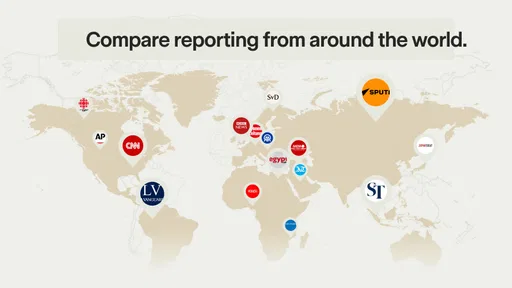
Ground News is a news aggregator app that offers users a comprehensive view of how different news outlets are covering a story. It aims to reduce bias by displaying articles from a variety of perspectives, including left, center, and right. Users can compare coverage, explore media bias ratings, and access factuality scores for a well-rounded understanding of the news.
Is Ground News free to use?
Ground News offers a free version that provides basic features, such as the ability to browse headlines and compare stories. However, for more advanced features like ad-free browsing, unlimited access to bias analysis, and additional customization options, a subscription to Ground News Premium is required. Pricing details are available within the app.
How does Ground News determine media bias and factuality?
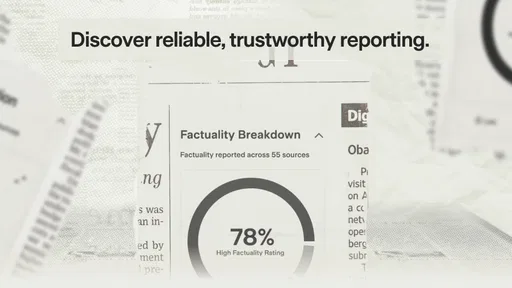
Ground News uses a combination of AI technology and human evaluation to assess media bias and factuality. It partners with organizations like Media Bias/Fact Check to provide ratings that reflect the political leaning and reliability of various news sources. Users can tap into these insights to better understand the slant and credibility of the news they consume.
Can I customize my news feed on Ground News?
Yes, Ground News allows users to customize their news feed based on personal interests and preferred topics. You can select specific categories such as politics, technology, or sports, and even exclude sources you prefer not to see. This customization ensures a personalized experience tailored to your interests and reading habits.
What platforms support Ground News?
Ground News is available for both Android and iOS devices, making it accessible to a wide range of users. You can download it from the Google Play Store for Android or the App Store for iOS. Additionally, Ground News can be accessed through its web platform, offering flexibility in how you choose to stay informed.
